



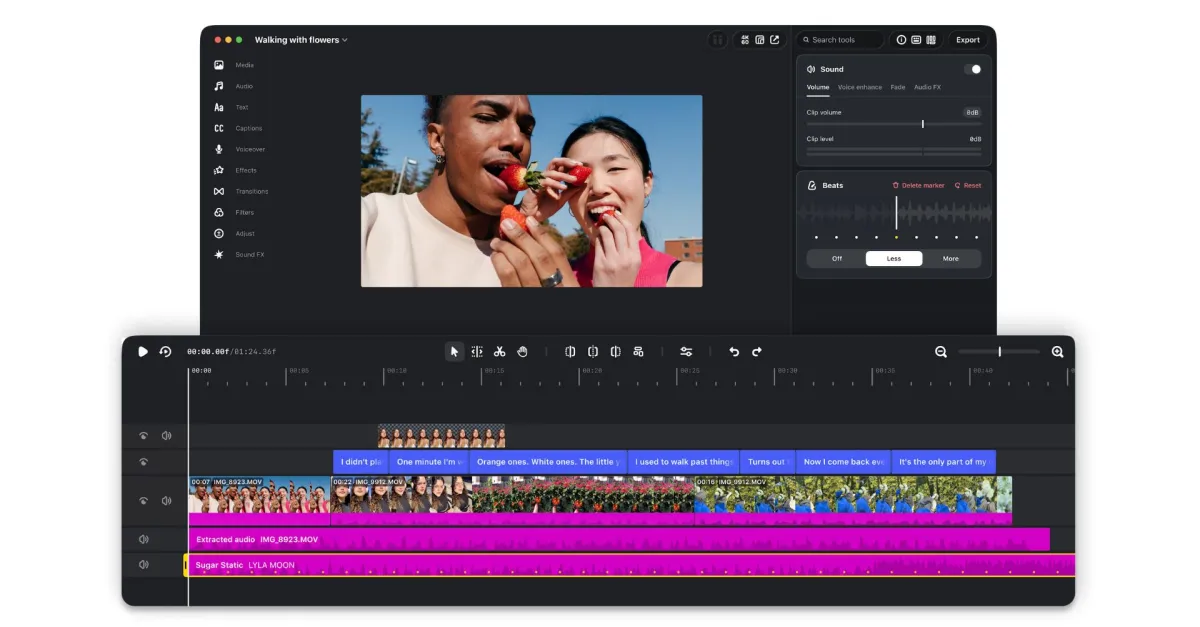
Instagram’s standalone video editing app is now available on macOS, where you can plug in your AI agent of choice to assemble your videos. Instagram’s Matthew Simari, head of product management for Edits, said in an interview with The Verge, “One of the things we’re releasing with Edits Desktop is a MCP for all the tools within Edits Desktop. You can use any agent you want, you can use Muse — we would love you to — but really any agent you want of [your] choice, to edit, tweak, work with your video.”
The Edits app originally launched on mobile platforms last year. Simari said creators have been “heavily” requesting a desktop version, but AI plans were also a factor in the expansion to macOS. Instagram added an AI “creative assistant” to the mobile version of Edits in September, which can give users video suggestions and feedback using data and metrics from their Instagram account like views and retention on their videos.
On the new desktop version of Edits, Simari said users can “go back and forth from agentic to manual editing.” He gave an example of a creator asking Meta’s Muse agent to use the Edits MCP to make a rough cut of a video in their downloads folder, saying, “It’ll be able just to go access that MCP, do the tool calls, make that rough cut for you, and then you can open that project file in Edits to continue editing.”
The jump to desktop follows Instagram’s push into longform, widescreen videos which tend to be a lot easier to edit on a larger screen. Meta says it’s “expanding Edits to support multiple aspect ratios” and adding support for watermark-free 4K exports. Beyond its AI features, the desktop version of Edits also has more advanced editing features like a full multi-track timeline and precise audio waveforms and color grading tools. It also supports keyboard shortcuts, which Meta says can be “carried over from another editor.”
Like the mobile Edits app, the desktop version has access to Instagram’s audio library and support for publishing videos directly to Instagram. Meta also says audio and text styles users have saved in the mobile app will be accessible from the desktop version, too.
However, the desktop app currently isn’t available on Windows or Linux, only macOS. You can’t edit the same project across both mobile and desktop yet, either. Meta says it’s working on cross-platform editing, and plans to update the new desktop app weekly.